We tell you about a new digital two way radio from Vertex Standard. We also review the new XLT SM500 Speaker Microphone.
Intro :00
Billboard 1:12
Discussion Topic 1:31
we tell you about the new Vertex eVerge EVX-S24 Digital Portable Two Way Radio. We'll give you an overview of its features and specifications and compare it to other popular DMR radios on the market.
Commercial Break 18:54
buytwowayradios.com 1:00
Product Review 19:50
We review the new XLT SM500 Speaker Microphone.
Questions and Answers 24:53
We read comments submitted to our e-mail and Two Way Radio Blog about our discussion on DMR radios in episode 106. Listeners whose comments we read win a FREE Two Way Radio Show T-Shirt! We also respond to a question from our Two Way Radio Forum.
Wrap up and Close 33:49
Send in your comments and questions for Danny, Anthony and Rick to show[at]buytwowayradios.com. Feedback on this and other topics will be read by the hosts and included in future episodes of the show. Visit us at www.twowayradioshow.com!
© 2016 Cricket Ventures, LLC. All rights reserved.
Podcast: Download (Duration: 34:41 — 31.8MB) | Embed
Subscribe: Apple Podcasts | Spotify | Email | RSS | More
[related_products is_auto_added="1"]We tell you about a new digital two way radio from Vertex Standard. We also review the new XLT SM-500 Speaker Microphone.

The Motorola free radio promotion is back - and this time it's even better!
When you purchase at least 6 Motorola CLP, CLS, RDX or RM Series analog business two way radios from Buy Two Way Radios, you can get another one FREE. When you purchase at least 5 Motorola DLR or DTR Series digital business radios, you get one FREE. You can apply this offer on a maximum of 60 analog or 50 digital radios purchased to receive a total of 10 free radios! This Motorola free radio offer is valid through December 31, 2016. If your company or organization needs new radios or needs to upgrade your existing fleet, this is a great opportunity to buy two way radios and save.
For example, if you buy six Motorola CLS™ Series™ analog business radios, you get an additional Motorola CLS radio free. Buy five Motorola DLR Series™ digital business radios and you get another DLR radio FREE. Six analog radios gets you get FREE one, five digital radios gets you a freebie. Every six analog or five digital radios purchased earns you an additional radio - with a potential maximum of 10 FREE radios. All six or five radios purchased must be within the same product series. This offer is fulfilled by Motorola directly, so the free radio(s) will be shipped to you after Motorola receives your online submission form.
NOTE: All redemption claims must be entered on or before 11:50 PM EST on Friday January 13, 2017. Redemption submissions received after that date will NOT be eligible regardless of purchase date. The offer is subject to product availability. Offer is good in the U.S., Canada and Puerto Rico only and is void where prohibited, taxed or restricted by law.
Read the Motorola Analog Radio promotional flyer and Motorola Digital Radio promotional flyer for full details.
The Following models qualify for the free radio offer:
| Model | Type | Min Purchase | Max Purchase |
|---|---|---|---|
| CLP1010 CLP1040 CLP1060 |
Analog | 6 | 60 |
| CLS1110 CLS1410 |
Analog | 6 | 60 |
| DLR1020 DLR1060 |
Digital | 5 | 50 |
| DTR410 DTR550 |
Digital | 5 | 50 |
| RDX RDU4100 RDX RDU4160d RDX RDV5100 |
Analog | 6 | 60 |
| RMM2050 RMU2040 RMU2080 RMU2080d RMV2080 |
Analog | 6 | 60 |
[related_products is_auto_added="1"]
When you purchase at least 6 Motorola CLP, CLS, RDX or RM Series analog or 5 Motorola DLR or DTR Series digital business radios from Buy Two Way Radios, you can get another one FREE. Limited time offer.

There are many reasons to choose Vertex Standard radios. They are tough, all-purpose, professional two way radios that are powerful and easy to use. Now there is another reason go with Vertex Standard - free Desert Cups!
When you purchase six Vertex Standard radios, you will also receive a FREE 30 oz. Stainless Steel Desert Cup for each radio purchased!
The Vertex Standard Desert Cup is a vacuum insulated, double wall cup that can keep your hot drink hot for up to 12 hours or your cold drink cold for up to 24 hours! The Desert Cup is valued at $30, but you can get it free when you purchase a minimum of of six Vertex Standard radios. You get one cup per radio, with a maximum of 24 cups!
The offer is good for all Vertex Standard portable handheld and mobile two way radios purchased from Buy Two Way Radios. The promotion offer is valid on up to 24 radios purchased for a maximum 24 cups (one cup per radio) through September 9, 2016. All radios must be ordered on a single order and on the same invoice. Multiple orders cannot be combined. Please allow 7-10 days from date of invoice to receive your cups. This offer is good only in the U.S. and is void where prohibited, taxed and restricted by law. Download the promotion flyer for details.
There are a limited number of cups available and the offer is available for a limited time, so if you want FREE Desert Cups with your radios get them before they're gone.
[related_products is_auto_added="1"]
When you purchase six Vertex Standard radios, you will also receive a FREE 30 oz. Stainless Steel Desert Cup for each radio purchased! Limited time offer.
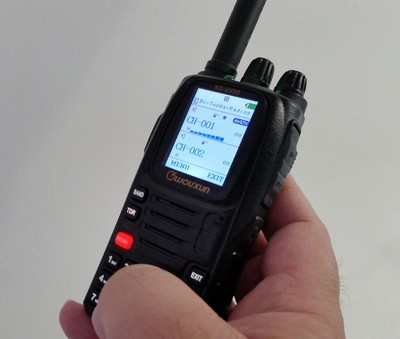 The Wouxun KG-UV9D is a multi-band portable handheld two way radio with Wouxun's iconic color LCD display, full DTMF keypad, and a lot of nice features, all at a great price. Such a powerful transceiver requires a bit of programming to utilize its options, and for the first time user, it can be intimidating. Looks can be deceiving, because it isn't as difficult as it seems. It's not that difficult at all, once you know how it's done.
The easiest way to Program the KG-UV9D is with a computer. When connected to an XLT Painless Programming Cable, the process is even easier, since the programming cable itself is so quick and easy to install. At present the only programming software for the UV9D is provided by Wouxun, however it is readily available from the manufacturer or from us if the radio was purchased from Buy Two Way Radios. The KG-UV9D is not yet supported by CHIRP, the popular open source programming software used to program a variety of other radios, such as the Wouxun KG-UV8D and Baofeng UV-5R.
Programming the KG-UV9D manually from the radio itself is much like programming other Wouxun radios, such as the KG-UV8D and its variants, the KG-UVD8 Plus and the tri-band KG-UV8E. In fact, the steps are almost exactly the same, with two exceptions. First, the A/B button was replaced with a TDR button, which is held down for two seconds to toggle between VFO and Channel modes. Second, the menu item numbers are different. For instance, on a KG-UV8D, 8D Plus or 8E, the menu option to assign a frequency to a channel (MEM-CH) is 28; on the KG-UV9D and 9D Plus, it is number 30.
Other than the TDR button and the numbering of the menu options, everything else is the same. If you know how to program the KG-UV8D, you have already mastered the KG-UV9D. If you haven't programmed a Wouxun radio before, follow the instructions below to program your Wouxun KG-UV9D or KG-UV9D Plus Limited Edition directly from the keypad of the radio and you will soon become the master of all these models.
How to manually program a simplex channel into the KG-UV9D
- Step 1. Press [BAND] and choose the A Side (upper display) as MAIN.
- Step 2. Press and hold [TDR] for two seconds and enter Frequency Mode.
The radio should be in Frequency (VFO) Mode to program all settings to the channel. - Step 3. Enter the frequency.
Use the keypad to enter the frequency into the radio. - Step 4. optional - Enter the transmit CTCSS/DCS code.
- CTCSS - [MENU] 16 [MENU] [enter/choose code XXXX] [MENU] [EXIT]
- DCS - [MENU] 18 [MENU] [choose code XXXXX] [MENU] [EXIT]
Use the [Arrow Up/Down] keys or the channel selector knob to choose the codes from the menu.
- Step 5. Assign the frequency to a channel.
[MENU] 30 [MENU] [enter channel number XXX] [MENU] [EXIT]
If the Channel number is displayed in blue, it is already assigned. Choose another channel.
If the channel number is red, the channel is available.
How to manually program a repeater channel into the KG-UV9D
- Step 1. Press [A/B] and choose the A Side (upper display) as MAIN.
- Step 2. Press and hold [TDR] for two seconds and enter Frequency Mode.
Like the simplex channels, the radio should be in Frequency (VFO) Mode to program all settings to the channel. - Step 3. Enter the frequency.
Use the keypad to enter the frequency into the radio. - Step 4. optional - Enter the transmit CTCSS/DCS code.
- CTCSS - [MENU] 16 [MENU] [enter/choose code XXXX] [MENU] [EXIT]
- DCS - [MENU] 18 [MENU] [choose code XXXXX] [MENU] [EXIT]
Use the [Arrow Up/Down] keys or the channel selector knob to choose the codes from the menu.
- Step 5. Input the repeater frequency offset.
Press [MENU] 28 [MENU] [enter the offset for 2 meter or 70 cm repeater] [MENU] [EXIT] - Step 6. Enter the Transmit Frequency Shift.
Press [MENU] 6 [MENU] [enter 1 for positive shift or 2 for negative shift] [MENU][EXIT]
Note: There are three ways to enter the frequency shift.- Enter 1 for positive (+) and 2 for negative (-).
- Press [Arrow Up/Down] to toggle + or -.
- Turn the channel selector knob to choose + or -.
- Step 7. Assign the frequency to a channel.
Press [MENU] 30 [MENU] [enter the channel number XXX] [MENU] [EXIT]
If the Channel number is displayed in blue, it is already assigned. Choose another channel.
If the channel number is red, the channel is available.
To add more channels, repeat the steps above. If these instructions are followed correctly step-by-step, you should be able to program all 999 memory channels in your Wouxun KG-UV9D. Note: These instructions will also work for KG-UV9D Plus.
[related_products is_auto_added="1"]
Follow the instructions below to manually program your Wouxun KG-UV9D, KG-UV9D Plus or KG-UV9D Plus LE Limited Edition directly from the keypad of the radio.
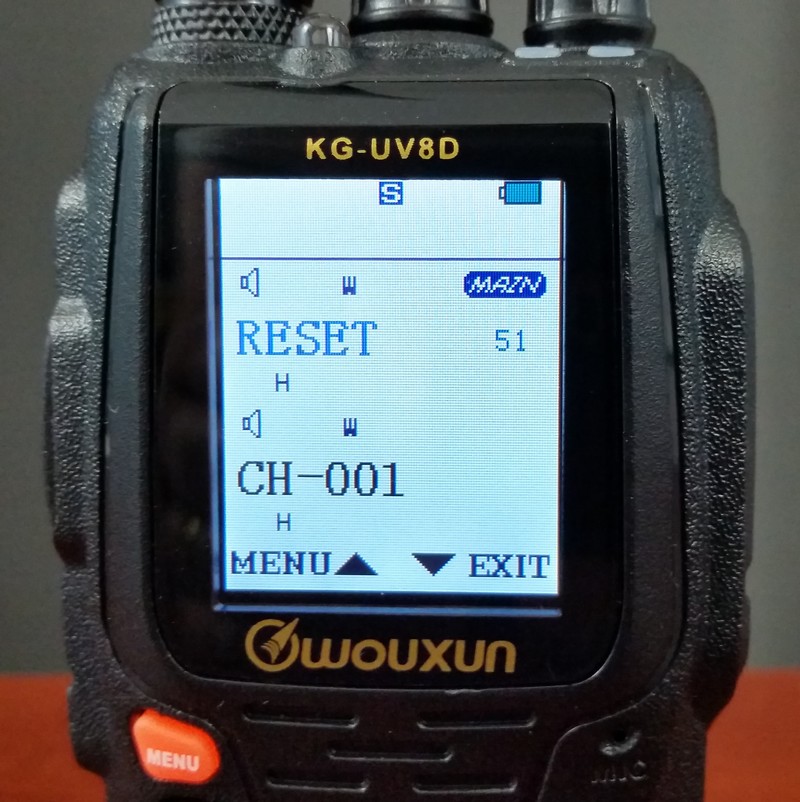 The Wouxun KG-UV8D two way radio has a quick and easy reset. The only downside to the reset operation is it also clears out all the language settings and sets them to the default. English is its second language. The default is Chinese. The reset process clears all the language settings, both voice prompts and menu items shown on the display. If you speak and read Chinese, that's not an issue. If English is your first or only language, fear not, we're here to help. if you can read this, follow the instructions below and post-reset navigation should not be a challenge.
There are two reset options.
Functional Parameter Reset (VFO)
the VFO option resets the function settings to factory defaults without wiping out the channel settings.
Total Parameter Reset (ALL)
The ALL option performs a full reset back to factory defaults and clears the channel settings.
Follow the steps below to reset a Wouxun KG-UV8D, KG-UV8D Plus, or KG-UV8E two way radio from Buy Two Way Radios to its original factory settings and English prompts.
To perform a VFO Reset
1. Turn on the radio and press the MENU button.
2. Press the UP and DOWN arrow key to select RESET (Menu Item 51).
3. Press MENU to choose RESET.
4. Press the UP/DOWN arrow keys to choose VFO.
5. Press MENU. The radio will display RESET SURE?
6. Press MENU to confirm. The radio will display Waite please (yes, "wait" with an "e") for a few seconds, then shut down and restart.
7. The radio will revert to Chinese language mode. Reset is complete.
To perform a FULL Reset
1. Turn on the radio and press the MENU button.
2. Press the UP and DOWN arrow key to select RESET (Menu Item 51).
3. Press MENU to choose RESET.
4. Press the DOWN arrow key to choose ALL.
5. Press MENU. The radio will display RESET SURE?
6. Press MENU to confirm. The radio will display Waite please for a few seconds, then shut down and restart.
7. The radio will revert to Chinese language mode. Reset is complete.
To set language from Chinese to English
1. Press MENU.
2. Press the UP and DOWN arrow key to select LANGUAGE (Menu Item 12). Note: the menu will be in Chinese, so the next two steps are important if you cannot read Chinese characters.
3. Press MENU.
4. Press the DOWN arrow key once.
5. Press MENU.
6. Press EXIT.
A reset may resolve many issues or malfunctions, but may not work for every scenario. However, it is usually a recommended first step when troubleshooting a two way radio.[related_products is_auto_added="1"]
Follow the steps below to reset a Wouxun KG-UV8D, KG-UV8D Plus, or KG-UV8E two way radio from Buy Two Way Radios to original factory settings and English prompts.
The Wouxun KG-UV8D is a popular dual band handheld two way radio for a reason. It has great performance, it's loaded with features, and it has a nice, large, color LCD display. It's also reasonably priced.
Then there is programming.
Programming the KG-UV8D isn't very difficult if you do it with a computer. Although the programming software provided by Wouxun isn't perfect, it's really not too bad, and it's not too difficult to figure out over time. Of course, if you have the open source programming software called CHIRP, it's even better, because it now supports the original KG-UV8D. CHIRP is freely available online.
For the most part, programming the KG-UV8D from a PC is relatively painless, especially when connected to an XLT Painless Programming Cable from Buy Two Way Radios. Programming it manually from the radio itself is another topic. To someone who is not familiar with the process, it can certainly be confusing or downright frustrating. Yet, there may come a time when you need to program your 8D and there is no computer or programming cable handy. There may be a time and place when you may need to do it manually. What do you do? How do you do it?
Follow the instructions below to manually program your Wouxun KG-UV8D, KG-UV8D Plus or KG-UV8E directly from the keypad of the radio.
How to manually program a simplex channel
- Step 1. Press [A/B] and choose the A Side (upper display) as MAIN.
- Step 2. Press [VFO/MR] and enter Frequency Mode.
The radio should be in Frequency (VFO) Mode to program all settings to the channel. - Step 3. Enter the frequency.
Use the keypad to enter the frequency into the radio. - Step 4. optional - Enter the transmit CTCSS/DCS code.
- CTCSS - [MENU] 16 [MENU] [enter/choose code XXXX] [MENU] [EXIT]
- DCS - [MENU] 18 [MENU] [choose code XXXXX] [MENU] [EXIT]
Use the [Arrow Up/Down] keys or the channel selector knob to choose the codes from the menu.
- Step 5. Assign the frequency to a channel.
[MENU] 27 [MENU] [enter channel number XXX] [MENU] [EXIT]
If the Channel number is displayed in black, it is already assigned. Choose another channel.
If the channel number is blue, the channel is available.
How to manually program a repeater channel
- Step 1. Press [A/B] and choose the A Side (upper display) as MAIN.
- Step 2. Press [VFO/MR] and enter Frequency Mode.
Like the simplex channels, the radio should be in Frequency (VFO) Mode to program all settings to the channel. - Step 3. Enter the frequency.
Use the keypad to enter the frequency into the radio. - Step 4. optional - Enter the transmit CTCSS/DCS code.
- CTCSS - [MENU] 16 [MENU] [enter/choose code XXXX] [MENU] [EXIT]
- DCS - [MENU] 18 [MENU] [choose code XXXXX] [MENU] [EXIT]
Use the [Arrow Up/Down] keys or the channel selector knob to choose the codes from the menu.
- Step 5. Input the repeater frequency offset.
Press [MENU] 23 [MENU] [enter the offset for 2 meter or 70 cm repeater] [MENU] [EXIT] - Step 6. Enter the Transmit Frequency Shift.
Press [MENU] 24 [MENU] [enter 1 for positive shift or 2 for negative shift] [MENU][EXIT]
Note: There are three ways to enter the frequency shift.- Enter 1 for positive (+) and 2 for negative (-).
- Press [Arrow Up/Down] to toggle + or -.
- Turn the channel selector knob to choose + or -.
- Step 7. Assign the frequency to a channel.
Press [MENU] 27 [MENU] [enter the channel number XXX] [MENU] [EXIT]
If the Channel number is displayed in black, it is already assigned. Choose another channel.
If the channel number is blue, the channel is available.
To add more channels, repeat the steps above. If these instructions are followed correctly step-by-step, you should be able to program all 999 memory channels in your Wouxun KG-UV8D. Note: These instructions will also work for KG-UV8D Plus and KG-UV8E radios.
[related_products is_auto_added="1"]
Follow the instructions below to manually program your Wouxun KG-UV8D, KG-UV8D Plus or KG-UV8E directly from the keypad of the radio.
We debate whether or not DMR is becoming the de facto digital standard. We also review the new Vertex Standard eVerge EVX-261 Digital Portable Two Way Radio.
Intro :00
Billboard 1:18
Discussion Topic 1:36
we debate whether or not DMR is becoming the de facto digital standard. We'll discuss the different types of digital standards available, compare the pros and cons of each, and contemplate the possibility one of them could overtake the others to become the primary standard in the marketplace. Do you think DMR is becoming the digital standard? Send in your comments to [email protected]. If we read your comments on the next episode we'll send you a FREE Two Way Radio Show T-Shirt!
Commercial Break 24:59
buytwowayradios.com 1:00
Product Review 25:55
We review the Vertex Standard eVerge EVX-261 Digital Portable Two Way Radio.
Questions and Answers 42:14
Questions from readers of our Two Way Radio Blog and members of the Two Way Radio Forum.
Wrap up and Close 51:44
Send in your comments and questions for Danny, Anthony and Rick to show[at]buytwowayradios.com. Feedback on this and other topics will be read by the hosts and included in future episodes of the show. Visit us at www.twowayradioshow.com!
© 2016 Cricket Ventures, LLC. All rights reserved.
Podcast: Download (Duration: 52:33 — 48.2MB) | Embed
Subscribe: Apple Podcasts | Spotify | Email | RSS | More
[related_products is_auto_added="1"]We debate whether or not DMR is becoming the de facto digital standard. We also review the new Vertex Standard eVerge EVX-261 Digital Portable Two Way Radio.
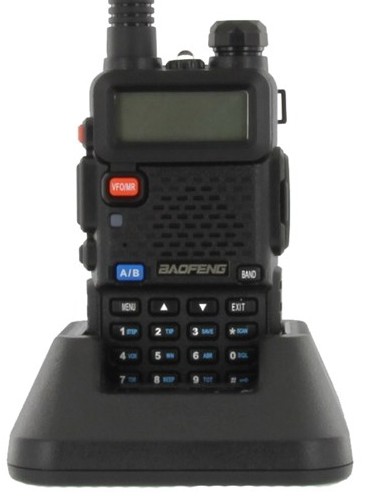 The Baofeng UV-5R is one of the most popular dual band handheld two way radios on the market worldwide. It's compact, feature packed, and very inexpensive. For many users who are new to programming portables, it is also one of the most challenging to program, primarily due to a poorly written user manual and an all but complete lack of support from its manufacturer, Baofeng.
Fortunately, there are some helpful resources available from a global community of UV-5R enthusiasts, including an easier to read and understand owner's manual and an excellent software application designed to program the UV-5R from a computer. The programming software is called CHIRP, and it is freely available online.
Of course, CHIRP is a great solution, provided you have a computer, an easy to install programming cable and the time to input all the data for 128 channels. But, what if you are on the road or out in the field and don't have a computer handy? What if you need to add in a frequency or program a channel on the fly?
We often receive calls from customers who just purchased their first Baofeng UV-5R from Buy Two Way Radios and want to know how to to operate it. More specifically, they want to know how to program their radio manually, directly from the radio itself.
So, here's how to do it. Follow the instructions below to manually program your Baofeng UV-5R direct from the keypad of the radio.
How to manually program a simplex channel
- Step 1. Press [VFO/MR] and enter Frequency Mode.
- Step 2. Press [A/B] and choose the A Side (upper display).
The A side must be used to program channels into the radio. Programming data entered on the B Side (lower display) will not be saved. - Step 3. Press [BAND] for the frequency band.
Toggle [BAND] to choose 136 MHz (VHF) or 470 MHz (UHF).
If the incorrect band is chosen for the frequency entered in Step 5, the radio will cancel the operation. - Step 4. Disable TDR (Dual Watch/Dual Standby).
Press [MENU] 7 [MENU] [press up/down arrow keys] OFF [MENU] [EXIT]
It is highly advised to turn TDR off when programming directly from the radio. - Step 5. Enter the frequency.
Use the keypad to enter the frequency into the radio. - Step 6. optional - Enter the transmit CTCSS/DCS code.
- CTCSS - [MENU] 13 [MENU] [enter/choose code XXXX] [MENU] [EXIT]
- DCS - [MENU] 12 [MENU] [choose code XXXXX] [MENU] [EXIT]
- Step 7. Assign the frequency to a channel.
[MENU] 27 [MENU] [enter channel number XXX] [MENU] [EXIT]
How to manually program a repeater channel
- Step 1. Press [VFO/MR] and enter Frequency Mode.
- Step 2. Press [A/B] and choose the A Side (upper display).
Like the simplex channels, the A side must be used to program the repeater channels into the radio. Programming data entered on the B Side (lower display) will not be saved. - Step 3. Press [BAND] for the frequency band
Toggle [BAND] to choose 136 MHz (VHF) or 470 MHz (UHF).
If the incorrect band is chosen for the frequency entered in Step 6, the radio will cancel the operation. - Step 4. optional - Clear any CTCSS/DCS codes previously assigned to the channel.
If no previous codes exist or when setting up the channel for the first time and no codes are needed, set the menu items listed below to OFF.- RX DCS - [MENU] 10 [MENU] [enter 0 (OFF)] [MENU] [EXIT]
- RX CTCSS - [MENU] 11 [MENU] [enter 0 (OFF)] [MENU] [EXIT]
- TX DCS - [MENU] 12 [MENU] [enter 0 (OFF)] [MENU] [EXIT]
- TX CTCSS - [MENU] 13 [MENU] [enter 0 (OFF)] [MENU] [EXIT]
- Step 5. Disable TDR (DualWatch/Dual Standby).
Press [MENU] 7 [MENU] [press up/down arrow keys] OFF [MENU] [EXIT]
It is highly advised to turn TDR off when programming directly from the radio. - Step 6. optional - Delete any existing data on the channel to program.
Skip this step when setting up the channel for the first time.
Press [MENU] 28 [press up/down arrow keys to choose channel number] [MENU] [EXIT]
It is highly advised to turn TDR off when programming directly from the radio. - Step 7. Enter the repeater output (your receiving) frequency.
Use the keypad to enter the frequency into the radio. - Step 8. Input the repeater frequency offset.
Press [MENU] 26 [MENU] [enter the offset for 2 meter or 70 cm repeater] [MENU] [EXIT] - Step 9. Enter the Transmit Frequency Shift.
Press [MENU] 25 [MENU] [enter 1 for positive shift or 2 for negative shift] [MENU][EXIT] - Step 10. optional - Enter the transmit CTCSS/DCS code.
- CTCSS - [MENU] 13 [MENU] [enter/choose code XXXX] [MENU] [EXIT]
- DCS - [MENU] 12 [MENU] [choose code XXXXX] [MENU] [EXIT]
- Step 11. Assign the receive frequency entered in Step 7 to the channel.
[MENU] 27 [MENU] [enter channel number XXX] [MENU] [EXIT] - Step 12. Press the [*Scan] button to activate Reverse Mode and display the transmit frequency.
- Step 13. Assign the transmit frequency to the channel.
Press [MENU] 27 [MENU] [enter the same memory channel entered in step 12] [MENU] [EXIT] - Step 14. Press the [*Scan] button to exit Reverse Mode.
To add more channels, simply repeat the steps above. If these step-by-step instructions are followed correctly, you should be able to program all 128 channels (000-127) in your Baofeng UV-5R as you need.[related_products is_auto_added="1"]
Follow the instructions below to manually program your Baofeng UV-5R direct from the keypad of the radio.
The two way radio is a powerful tool for short range communications, and for a number of reasons. There are no recurring connection charges, no subscription or usage fees, and it is easy to operate. Perhaps the best reason is the almost instantaneous connection. There is no dialing involved. Simply push a button and talk.
That is how a two way radio is supposed to work, and that is what users expect it to do. Many expect the radio to do it as soon as it is turned on, right out of the box, and some radios do. However, some of them don't, and a user who is not familiar with how a radio works may assume their brand new, freshly unboxed transceiver may not work at all. To those who are new to radio, it can be a real source of confusion and frustration.
While it is possible to receive a product prone to malfunction, such damage or defect isn't usually the issue. In fact, in all likelihood, there is probably nothing inherently wrong with the device itself at all. More often than not, the radio simply needs to be programmed.
The two way radios of today usually fall under one of two general categories: those that need to be programmed by the user, and those that don't. Some radio services, such as FRS, GMRS, CB and MURS, require the devices to operate on specific frequencies and/or within certain parameters, which means the radios operating within those services are generally pre-packaged and "hard programmed" at the factory to meet those requirements. An exception to this is Wouxun, which, while hard programming the service channels, does allow the end user to custom program additional memory channels and other advanced features into their radios.
Other radio services are more flexible, and the radios operating within them are more flexible as well. These transceivers are designed for partial or full programmability by the owners themselves. That's a lot of accessibility, power and control over a device, particularly one used for communication, and many radio operators want and prefer to take full advantage of it whenever possible.
As these programmable two way radios become more sophisticated, so does their programming. Many can be programmed from the units themselves, usually either through a set of buttons or a full keypad embedded in the radio. However, some of them don't have that option, and even some that do require additional input by the user that can be cumbersome, complicated and often confusing for anyone who hasn't studied the manual from cover to cover (and if it is a manual for some imported radios, even if they have). In such scenarios, programming the radio via computer is generally considered a more practical or desirable option.
Some radios, such as lower end models used by many small businesses, retailers or localized business operations, may need to have only limited user programmability or may need to be completely locked down to prevent users from tampering with their functions and settings. These radios may be pre-programmed with frequencies, CTCSS/DCS codes and other features at the factory or by a dealer, allowing the end user a preset choice of programmable options.
Most higher end radios used for commercial, industrial, business purposes or public service operations are fully programmable and may be programmed by the dealer or the end user. Transceivers used in amateur radio are almost always fully programmable, and are usually shipped without any pre-programming from the manufacturer or dealer. These units must be programmed by the end user before they are able to transmit or receive calls.
The chart below lists the programmability of different types of two way radios we carry at Buy Two Way Radios. It is not intended to detail the programming capabilities or limitations of every make and model, only to provide the basic differences between them.
Two Way Radio Programmability Chart
| Radio Service | Manufacturer | Model | Programmable | Programmer |
|---|---|---|---|---|
| Airband | Icom | IC-A6 IC-A14 |
Yes | Dealer/End User |
| Amateur (HAM) | Baofeng Icom Leixen TYT Wouxun |
All | Yes | End User |
| Citizen's Band (CB) | Cobra Midland Galaxy President Uniden |
All | No | Manufacturer |
| Business Band | BlackBox Hytera Icom Kenwood Motorola Olympia Vertex Standard |
All | Yes | Dealer/End User |
| FRS | Cobra Midland Motorola Olympia Uniden Wouxun |
All | No No No No No Yes |
Manufacturer Manufacturer Manufacturer Manufacturer Manufacturer End User |
| GMRS | Midland Wouxun |
All All |
No Yes |
Manufacturer End User |
| VHF Marine | Cobra Icom Uniden |
All | No | Manufacturer |
Additional resources:
Motorola RDX Two Way Radio Programming Software
How to program Motorola DLR1020 and DLR1060 Advanced Configuration options
How to Clone a Motorola RDX Two Way Radio
Don't Let Your Two Way Radio Dealer Hold You Hostage
How to Wirelessly Clone Kenwood Protalk Radios
How to program the Wouxun KG-UV920P mobile radio from a PC
How to program a frequency into the Wouxun KG-UV920P-A
Radio Compatibility: Which Models Will Work Together[related_products is_auto_added="1"]
The chart below lists the programmability of different types of two way radios we carry at Buy Two Way Radios.
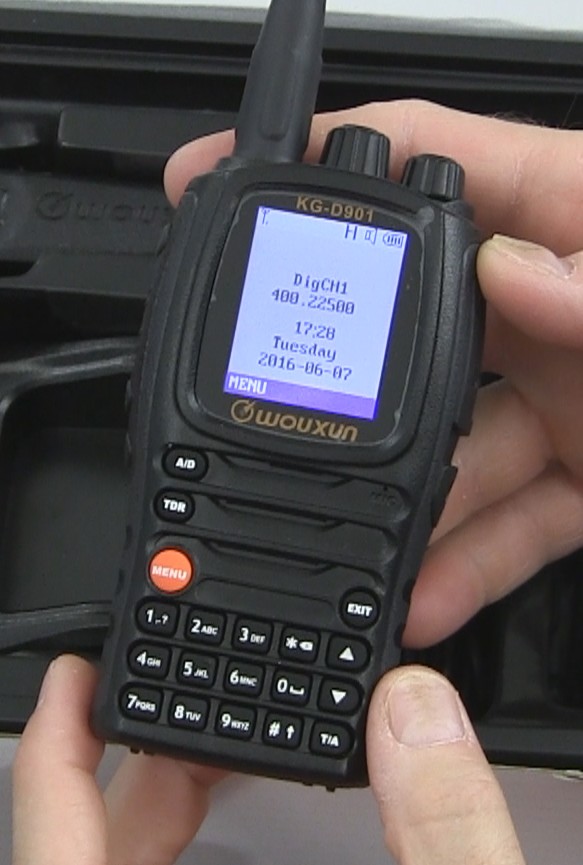 Last year we broke the news about a new portable DMR radio, the KG-D901. We announced it on our blog, covered it in Episode 99 of the Two Way Radio Show Podcast, and gave the world a first look at it in our Wouxun KG-D901 preview video.
Yes, it was certainly news, but it wasn't just about the radio itself. What made this newsworthy was the fact it was the first DMR from Wouxun, and it was an announcement of their plan to enter the digital radio market. Now their entrance is official. The Wouxun KG-D901 DMR Digital Two Way Radio has arrived!
Since we've told you about the radio already, we won't repeat it all here. The info and specs on the Wouxun KG-D901 are available at Buy Two Way Radios, and now, so is the radio!
There is just one thing to note. At the time of this publication, the Wouxun KG-D901 is currently available in a very limited quantity, so if you want to be one of the first to have it, you may want to get it now.
[related_products is_auto_added="1"]
The new Wouxun KG-D901 DMR Digital Two Way Radio has arrived and is available at Buy Two Way Radios in a limited quantity.