Applicable Products: Wouxun PCO-001, PCO-003 and PCO-009 programming cables
If you are running Windows 11 with the latest updates, it is possible the driver for the Wouxun programming cables will install automatically, as Windows may include a Silicon Labs USB driver in its driver list. Otherwise, follow the instructions in the video above.
This video is for anyone who has questions about downloading the driver for Wouxun PCO-001/PCO-009, and PCO-003 Programming cables. To avoid any complication, it is highly recommended that you follow the instructions in the video before attempting to install the cable or plug it into the computer for the first time. The driver is available as a free download on the product page for these Wouxun Programming cables - which you can order from Buy Two Way Radios.
You can also find the driver on our list of the most popular downloads on our website.[related_products is_auto_added="1"]
If you are Installing a Wouxun programming cable in a computer running Windows 11, follow the instructions in this video before attempting to install the cable or plug it into the computer for the first time.
Get ready for the next generation of affordable dual band digital radio comms for both business and amateur use! Introducing the TYT MD-UV390 Plus DMR Digital Radio!
In this video clip from episode 181 of The Two Way Radio Show Podcast, Tanner and Rick discuss the primary features that make this a premium DMR radio at an amazingly low price. The MD-UV390 Plus is available at Buy Two Way Radios.
Listen to the full Two Way Radio Show podcast and Subscribe to the show!
Want more videos about 2-way radios? Browse our video blog and subscribe to our YouTube channel![related_products is_auto_added="1"]
In this video clip from episode 181 of The Two Way Radio Show Podcast, Tanner and Rick discuss the primary features that make this a premium DMR radio at an amazingly low price.
One of the most value added features of the TYT MD-UV390 Plus DMR digital two way radio is its capability for high level encryption. Of course, many DMR radios on the market offer encryption. The TYT DMR models such as the MD-380, MD-UV380 and MD-390 offer strong security with 128-bit encryption. The TYT MD-UV390 Plus is capable of AES 256-bit encryption.
Unfortunately, accessing 256-bit level encryption in the programming software is not at all intuitive. There is a little known trick to it, but once you know, you know. And we're going to tell you how to do it.
To set up the encryption, you will first need to put the programming software in AES 256-bit encryption mode. Here is how to do it in three simple steps.
1. Click on Privacy Setting and enter the encryption setting interface.
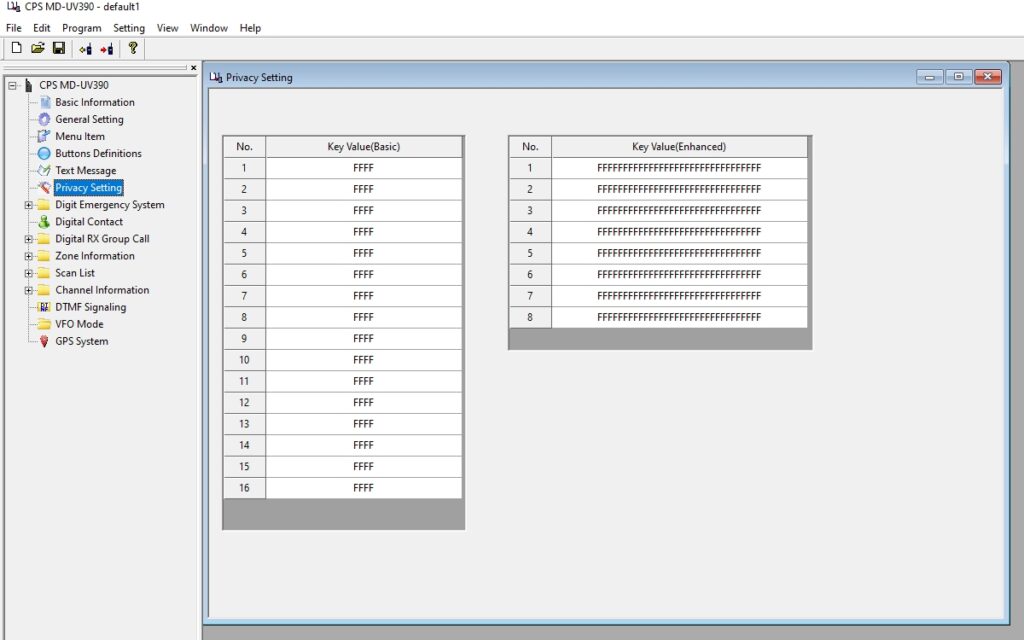
2. Press and hold CRTL + SHIFT + P on the keyboard, and a prompt to restart will appear.
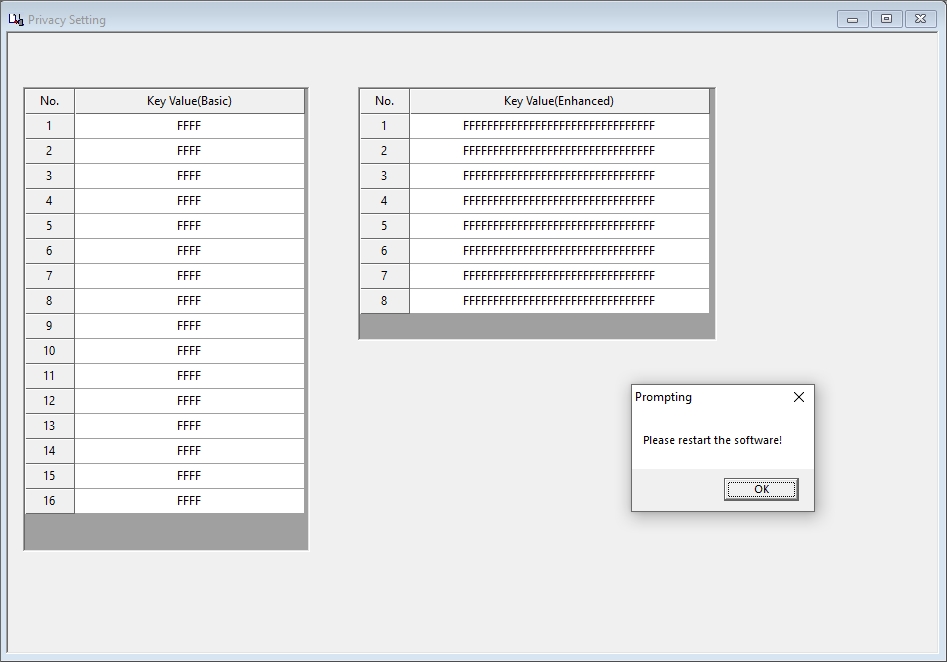
3. Click the "OK" button and the software will close. Run the software again, click on Privacy Settings, and there will be two tabs labeled Basic/Enhanced and Universal. The 256 encryption option will appear in the encryption settings.
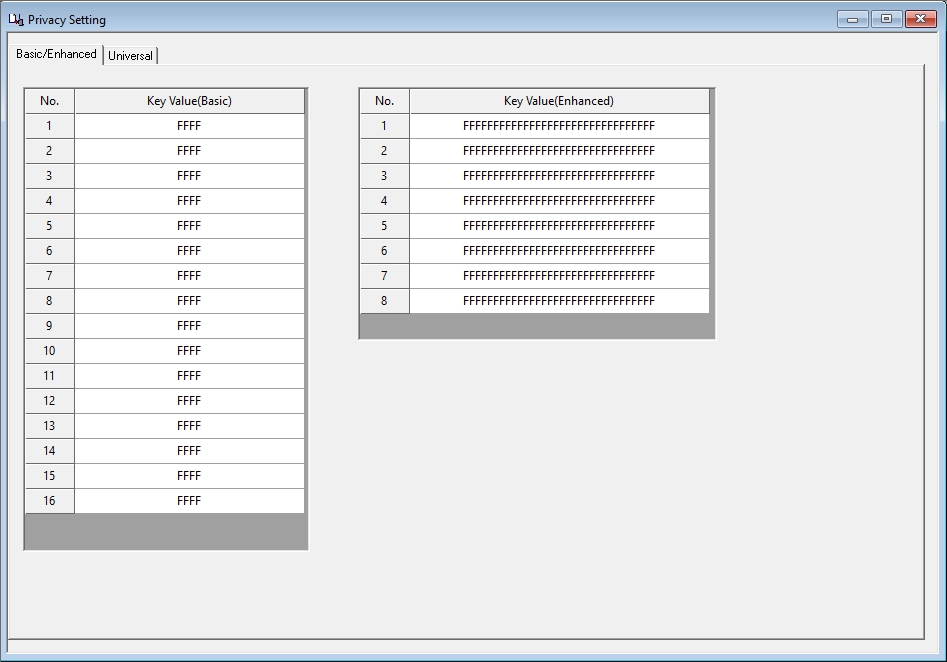
All you need to do then is set up your encryption keys. After the first time, the programming software should be in 256-bit encryption mode when you run it.[related_products is_auto_added="1"]
One of the most value added features of the TYT MD-UV390 Plus DMR digital two way radio is its capability for high level encryption. Of course, many DMR radios on the market offer encryption. The TYT DMR models such as the MD-380, MD-UV380 and MD-390 offer strong security with 128-bit encryption. The TYT MD-UV390 Plus […]
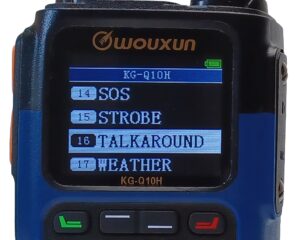 Many two way radios have a feature called Talk Around. While not found on basic or entry level consumer radios, it is often included in higher end business, ham and even some GMRS models that can connect to repeaters. But what is it? What does it do? Most importantly, is it something you really need?
The Talk Around feature does exactly what the term implies. It allows a radio that is communicating through a repeater to bypass it and communicate directly to the radio on the other end of the connection instead, essentially "talking around" the repeater.
It's a simple concept, but to fully understand how this works, it is important to know how a repeater operates. Repeaters work by receiving a signal on one frequency and transmitting on another frequency that is spaced apart from the receiving frequency by a specified amount of bandwidth. This spacing is generally referred to as an offset. This allows the repeater to receive an incoming radio transmission and "repeat" the transmission across a broader expanse and higher power output, effectively increasing the overall range of the radios that communicate through it.
When a radio is using Talk Around, it is circumventing this communication through the repeater. Instead of transmitting and receiving these signals on two different frequencies, The Talk Around function allows the radio to both transmit and receive on the same frequency in simplex mode, bypassing the repeater entirely.
This can be very useful when the repeater is nearly out of range, is not operating, or if the radios that are communicating with one another are within range of one another and simplex comms are preferred.[related_products is_auto_added="1"]
Many two way radios have a feature called Talk Around. it is sometimes included in higher end business, ham and even some GMRS models that can connect to repeaters. But what is it? What does it do? And is it something you really need?
We tell you about a low cost dual band digital two way radio from TYT that’s a Plus. We’ll give you an overview of its features and specifications and compare it to the original version of this radio. We’ll also take some of your comments and questions from our blog and our forum.
Intro :00
Billboard 1:09
The TYT MD-UV390 Plus DMR Digital Radio 1:24
When TYT introduced the MD-380 in 2015, it set the bar for affordable digital DMR radios and brought many hams and even some small businesses into the digital age. Then came a dual band model, the MD-UV380. Now TYT is doing it again, with the introduction of a dual band digital DMR radio with GPS, IP67 dust and water protection, and 256-bit digital encryption, plus many other features, the MD-UV390 Plus.
Questions and Answers 23:34
Comments and questions from our blog and members of the Two Way Radio Forum. Check out and join the forum! It's free!
Wrap up and Close 28:05
Send in your comments and questions for Danny, Anthony and Rick to show[at]buytwowayradios.com. Feedback on this and other topics will be read by the hosts and included in future episodes of the show. If we read your comment about this episode on a future episode, we may send you a free t-shirt or some swag! Visit us at www.twowayradioshow.com!
© 2023 Cricket Ventures, LLC. All rights reserved.
Podcast: Download (Duration: 28:48 — 26.5MB) | Embed
Subscribe: Apple Podcasts | Spotify | Email | RSS | More
[related_products is_auto_added="1"]We tell you about a low cost dual band digital two way radio from TYT that’s a Plus. We’ll give you an overview of its features and specifications and compare it to the original version of this radio.
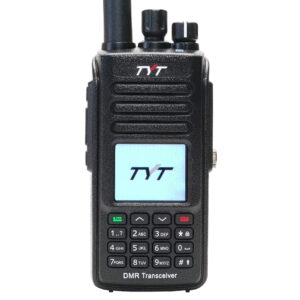 TYT is a leader in DMR, particularly among the amateur radio crowd. The MD-380 has long been the go-to DMR radio for hams, the MD-390 has its niche, and the MD-9600 is an extremely popular mobile digital radio as well. A few years ago the manufacturer added dual band capability to DMR with the MD-2017, MD-UV380 and MD-UV390. Now they are adding a Plus. Introducing the new TYT MD-UV390 Plus Waterproof Dual Band DMR Digital Two Way Radio!
The new TYT MD-UV390 Plus has a lot of the same features as its predecessors, plus GPS, IP67 dust and water protection, AES-256 encryption and more. Let's learn more about each one of these.
Dual Band DMR
The original MD-390 was a single band DMR radio and was available in UHF and VHF versions. The MD-UV390 Plus GPS operates in either analog or digital mode on 136-174MHz VHF frequencies at up to 5 watts and 400-480MHz frequencies in the UHF band at up to 4 watts. Of course, as a DMR radio, it uses Time-Division Multiple-Access (TDMA) digital technology on a single 12.5kHz channel at either high or low power.
AES 256 Encryption
Digital encryption is nothing new, and is standard for other TYT DMR radios. For instance, the original MD-390 supports 128-bit encryption, and it is difficult to break with today's technology, which makes it still quite secure. The MD-UV390 Supports AES 256-bit encryption. This means that the encryption key is double the length of the 128-bit encryption key on previous models, making the UV390 Plus even more secure.

TYT MD-UV390 Plus with PTT button
IP67 Dust and Water Rating
For added protection against harsher outdoor environments, the MD-UV390 Plus is rated IP67 dust and waterproof. The rating indicates the radio is impervious to ingress from dust and is submersible in up to 1 meter of water for a duration of up to 30 minutes. This means that the MD-UV390 Plus can handle a myriad of dirty, wet and muddy conditions in the field, making it a rugged companion for use outdoors and in various emergency situations. It does not mean that it is considered intrinsically safe, which is important to keep in mind if one in considering a radio for use in potentially hazardous environments where there may be exposure to flammable or explosive materials. Such conditions require a radio with an IS certification and rating.
Also, it is important to note that The MD-UV390 Plus is dust and waterproof only when the accessory port is completely and properly covered and sealed. The radio is not fully waterproof when a headset or other accessory is connected to the audio accessory port.
GPS Capability
The MD-UV390 Plus is also equipped with GPS technology to can send and receive data between other DMR radios, including longitude, latitude and elevation. For the most part, if all of the radios are compatible with Motorola Digital Mobile Radio (DMR) Tier 2 Standard protocol, they should be able to send, receive and share this data. However, The MD-UV390 Plus does not natively support APRS.
Part 90 Type Accepted for Business
The MD-UV390 Plus is legal for amateur or business use. It is FCC type accepted for Part 90, which makes it a very economical choice for businesses, commercial operations and organizations that are moving to digital but want to avoid the expense of buying a $400-$1200 digital or analog/digital hybrid radio, or an entire fleet of them.
3000 Channels
Let's be honest here, most small businesses that use digital radios don't usually need more than 16 channels, and many of them can operate on less than four. This sort of thing is more attractive to the ham radio community. Even so, while nice to have, how many amateur operators actually need a thousand channels or more? Yet, TYT did it anyway, giving the MD-UV390 Plus no less than 3000 memory channels to store all of those frequencies for instant access as ostensibly needed.
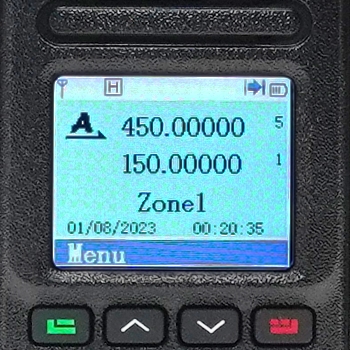
TYT MD-UV390 Plus Display
Color LCD Display
The TYT MD-380 and MD-390 series radios that have a color display, so it comes as no surprise that the MD-UV390 Plus has one too. While not quite as rich and colorful as the Wouxun analog models, it does rival the full color LCD display of the Wouxun KG-UVN1 DMR digital radio. The image is clear and sharp, the alphanumeric characters are easy to read, and the icons are simple and clean. Plus, the screen of the MD-UV390 Plus is brighter, making it easier to read in direct sunlight than the screen of the Wouxun radios.
Features and Functionality
All the standard features of other TYT MD Series digital DMR radios are in the MD-UV390 Plus as well. These include channel scan, priority channel scan, group call, private call and all call options, repeater capability, CTCSS/DCS support, custom display messages, text messaging, talkaround and DTMF support for remote commands such as stun, kill and activate. Most full featured, higher end business radios have these or equivalent features these days, it should come as no surprise they are included with the MD-UV390 Plus, except perhaps a clock. And it has one.

TYT-MD-UV390 Plus Dimensions
Size and Weight
The MD-UV390 Plus is similar in size and weight to its predecessors, measuring 5.15 inches high, 2.4 inches wide, and 1.41 inches deep. Although not a tiny transceiver, it's ergonomically comfortable to hold, operate and carry. Weighing in at 9.1 ounces, it's not a heavy handheld, either.
Programming the MD-UV390 Plus
The MD-UV390 Plus requires the programming software provided by TYT. Although some items can be customized from the radio menu, it is highly recommended to use the programming software for full access to the radio. Every feature and function of the radio in both analog and digital modes can be configured from there.
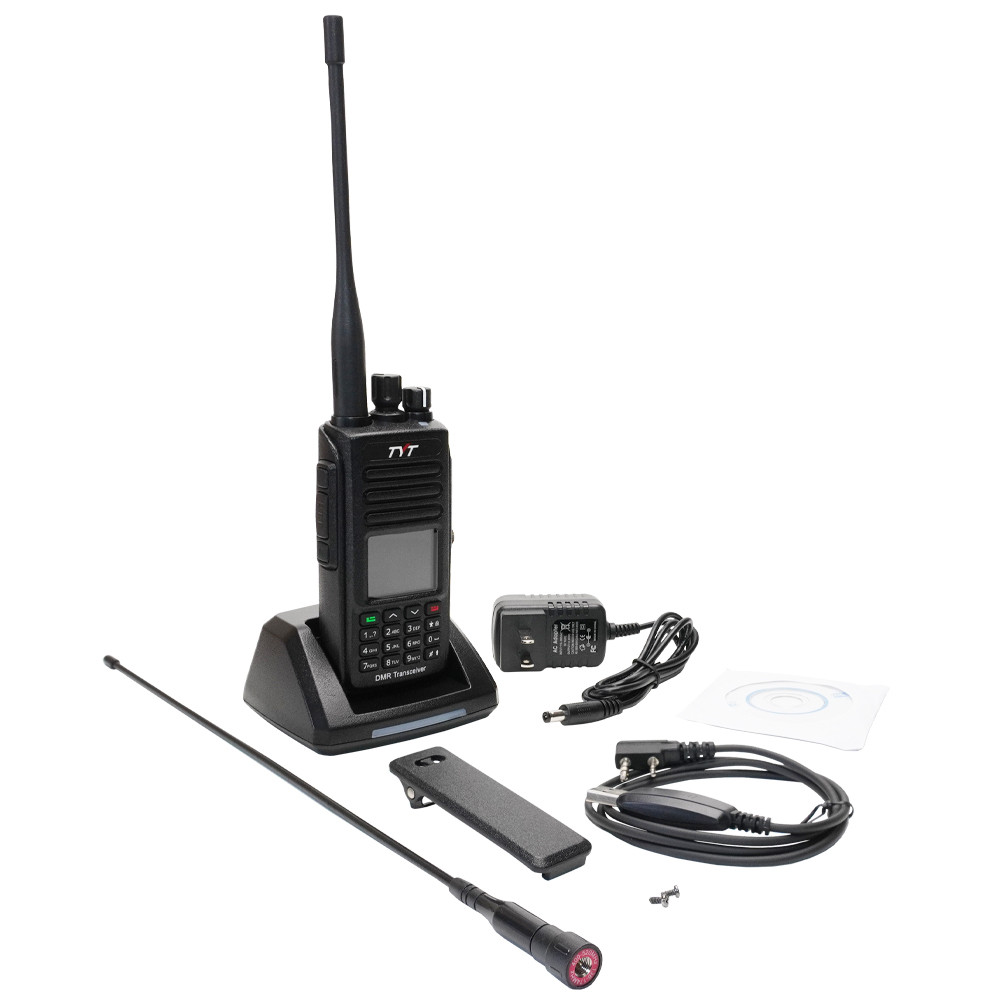
TYT-MD-UV390 Plus Accessories
The UV390 Plus has two programmable side keys. Each key can be programmed to perform two separate functions, one on a short press, the other on a long press of the key. The list of assignable functions includes Alert Tones, Power Select, Monitor, Repeater/Talkaround, Scan, Record, Playback, VOX, Lone Worker, and more. There are more than 26 available functions on the list!
Accessories
The MD-UV390 Plus includes two removable antennas, belt clip, charger tray, AC cable, and an owner's manual. While not very comprehensive, the manual does help understand the main features and programmable options, so it's still worth a read.
The TYT MD-UV390 Plus is available from Buy Two Way Radios.
Price: $119.99.[related_products is_auto_added="1"]
The new TYT MD-UV390 Plus has a lot of the same features as its predecessors, plus dual band operation, IP67 dust and water protection, and AES-256 encryption. Here is an overview of this digital DMR radio.
NOTE: This promotion expired August 31, 2023 and is no longer available.
Get ready for a sizzling summer special on business two way radios! Buy any Wouxun brand business radio and you get one (1) FREE speaker microphone! Every radio purchased earns you a free speaker mic - with no limit of FREE speaker microphones during the promotion period - while supply lasts. This is a hot deal from Buy Two Way Radios and is available for a limited time only!
The FREE speaker microphone offer also applies to 6 packs. Purchase a six pack bundle of any Wouxun business radio and get a total of 6 speaker mics, one for each radio in the pack!
This offer is fulfilled by Buy Two Way Radios directly, so the free item(s) will be added to your shopping cart at time of purchase. Offer valid on Wouxun business radios purchased from August 1, 2023 through August 31, 2023. A minimum of 1 radio must be purchased to qualify. Offer valid only while supplies last. Offer terms and conditions apply.
The following Wouxun business radios are eligible for this offer.
| Series | Eligible Models |
Bands | Display | Minimum Purchase |
Maximum Purchase |
FREE Speaker Mic! |
|---|---|---|---|---|---|---|
| 820 | KG-824B | UHF/VHF | 1 | None | ✔ | |
| 820 | KG-824B 6 Pack | UHF/VHF | 1 | None | ✔ | |
| 820 | KG-826B | UHF/VHF | ✔ | 1 | None | ✔ |
| 820 | KG-826B 6 Pack | UHF/VHF | ✔ | 1 | None | ✔ |
| S-Series | KG-S84B | UHF | 1 | None | ✔ | |
| S-Series | KG-S84B 6 Pack | UHF | 1 | None | ✔ | |
| S-Series | KG-S84B 6 Pack + Multi-Charger | UHF | 1 | None | ✔ | |
| S-Series | KG-S86B | UHF | ✔ | 1 | None | ✔ |
| S-Series | KG-S86B 6 Pack | UHF | ✔ | 1 | None | ✔ |
| S-Series | KG-S86B 6 Pack + Multi-Charger | UHF | ✔ | 1 | None | ✔ |
NOTE: Radios must be purchased by 11:59pm EDT on Thursday, August 31, 2023 to qualify. Radios purchased after that date will NOT be eligible. All transactions are subject to validation. Offer is good to U.S. residents only and is void where prohibited, taxed or restricted by law.[related_products is_auto_added="1"]
Get ready for a sizzling special on business two way radios. Buy any Wouxun brand business radio and you get one FREE speaker microphone.
Update: Offer extended to December 31, 2023!
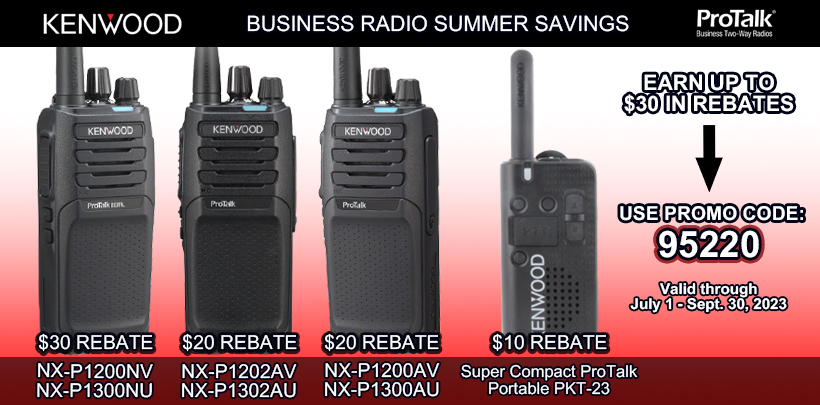
Kenwood has a Summer Savings rebate offer, and it's going on now. Buy a Kenwood ProTalk® radio between July 1 and December 31, 2023 and get a $10-$30 Rebate per radio, depending on the model.
Buy a Kenwood PKT-23 radio and get a $10 rebate per radio. Buy a NX-P1200AV, NX-P1300AU, NX-P1202AV, NX-P1302AU radio and you qualify for a $20 Rebate per radio. Buy a NX-P1200NV or NX-P1300NU and get a $30 Rebate per radio! This is a great rebate from Kenwood with no maximum purchase, which translates to substantial savings for your business or organization!
Buy at least one of the following Kenwood ProTalk® radios to get the rebate:
- Buy at least 1 PKT-23 = $10 Rebate
- Buy at least 1 NX-P1200AV = $20 Rebate
- Buy at least 1 NX-P1300AU = $20 Rebate
- Buy at least 1 NX-P1202AV = $20 Rebate
- Buy at least 1 NX-P1302AU = $20 Rebate
- Buy at least 1 NX-P1200NV = $30 Rebate
- Buy at least 1 NX-P1300NU = $30 Rebate
This offer is fulfilled by Kenwood directly, so the rebate will be mailed to you after Kenwood receives your online rebate form. Offer valid on radios purchased through December 31, 2023. Radio models listed are subject to availability. Limit of one rebate per radio. Click rebate promotion flyer for full details and register online with Promo Code 95220 at Kenwood's rebate website to claim your rebate.
NOTE: Model and claim information must be registered on-line on or before January 31, 2024 with promo offer number: 95220. Radios delivered before or after the promotion date are not eligible, regardless of invoice date. Offer good only in the U.S. and Puerto Rico and is void where prohibited, taxed or restricted by law.[related_products is_auto_added="1"]
Kenwood has a Summer Savings rebate offer, and it’s going on now. Buy a Kenwood ProTalk radio between July 1 and September 30, 2023 and get a $10-$30 Rebate per radio.
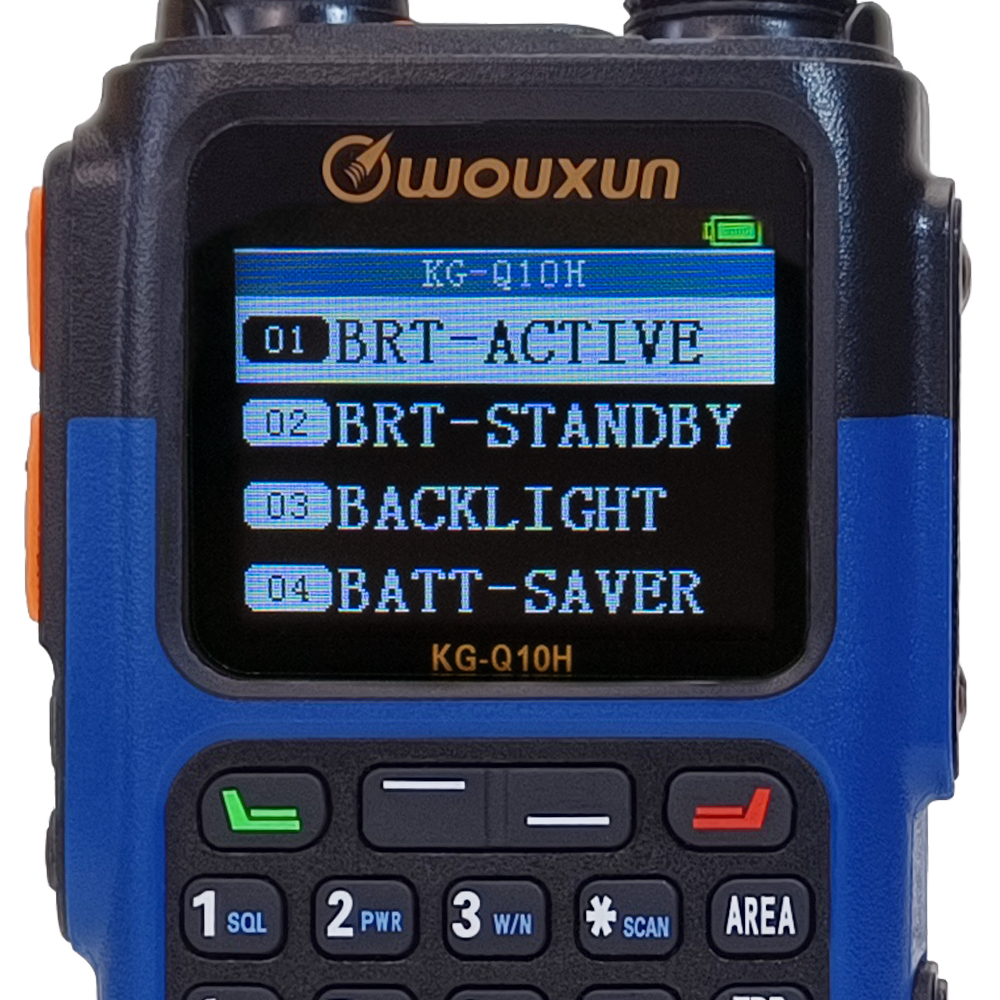 The Wouxun KG-Q10H is an extremely powerful and versatile portable handheld Amateur radio designed for power users who want maximum performance coupled with maximum functionality. Although it is similar to the S Series in some aspects, it has significant differences that set it apart from nearly every other radio out there, and includes several features that are new to two way radios altogether.
As a handheld radio, the Q10H is somewhat unique because it transmits on the four amateur radio bands, some at up to 6 watts of power. It can also receive on a multitude of other bands, include NOAA weather frequencies, aviation, and commercial FM radio stations. You won't find this on the shelf at a big box store, or any other retail store at all. The KG-Q10H is only available at Buy Two Way Radios.
KG-Q10H Key Features
- Quad Band Transmit (2m/1.25m/6m/70cm)
- 999 Memory Channels
- Superheterodyne Receiver
- 50-54 MHz (FM) Receive Only
- 76-108 MHz (FM) Receive Only
- 108-136 MHz (Airband, AM) Receive Only
- 136-174 MHz (FM) Receive Only
- 222-225 MHz (FM) Receive Only
- 320-480 MHz (FM) (Receive Only)
- 714-999 MHz (FM) (Receive Only)
- 7 NOAA weather Channels
- NOAA weather alerts
- 5 Weather Alert Notifications
- GPS Location Data Display
- Cross Band Repeat
- Up to 6 Maximum Transmit Power
- High/Mid/Low/Ultrahigh TX Power Levels
- Tune Specific Frequencies Directly (Frequency Mode)
- Simultaneous Dual Channel Receive
- Repeater Capable
- Standard and Non-Standard CTCSS/DCS Tones
- Split CTCSS/DCS Tone Support
- Channel Scan
- Priority Scan
- CTCSS/DCS Tone Scan
- Scan Group Support
- Favorite Channels
- Wide/Narrow Bandwidth Selectable
- Large Color Backlit LCD Dual Display
- 10 Display Color Theme Options
- 4 Customizable Display Themes
- Channel Name, Number or Frequency Display
- Incoming Caller ID Display
- Custom Display Messages
- Voltage Display
- Backlit Keypad
- Companding
- Scrambler
- DTMF Encoding and Decoding
- Group Call, All Call and Selective Call
- Timeout Timer
- Audible Button Beeps
- English Voice Prompts
- Transmit Overtime Alarm
- Scan Add/Delete
- Busy Channel Lockout
- Battery Meter
- Low Battery Alert
- Power Saver
- Reverse Frequency
- Talkaround
- VOX
- 2 Programmable Side Keys
- Programmable Top Key
- Built-in Flashlight
- Remote Stun/Kill/Monitor/Inspect
- Stopwatch Timer
- Clock Display
- Keypad Lock
- Built-in Flashlight
- Li-Ion Battery Pack (2600mAh)
- Rechargeable Battery Included
- USB-C Charging Port
- IP67 Dust and Waterproof
- Drop-In Charge Capable
- Audio Accessory Connector
- PC Programming Support
- Factory Reset
Programming the KG-Q10H
As it is with all Wouxun radios we carry, the KG-Q10H is fully programmable from a PC using a programming cable and the Wouxun KG-Q10H programming software or directly from the keypad of the radio itself.
Direct from the radio
If you already know how to program new channels and frequencies into almost any other Wouxun radio, you're all set. If not, or if you are new to programming radios altogether, no worries. The KG-Q10H owners manual is specifically written to get you up to speed quickly. The manual is written in plain English with instructions that are easy to understand. The Q10H has two menus.
Area Menu
The KG-Q10H Area menu consists of 26 items. Default settings are bold.
| Menu # | Menu Item | Description | Option |
|---|---|---|---|
| 01 | SQUELCH | Squelch settings | 1 to 9|5 |
| 02 | TX-POWER | Output power | HIGH|MID|LOW|UltraHigh|Varies |
| 03 | W/N | Wide/Narrow bandwidth settings | WIDE|NARROW|Varies |
| 04* | STEP | Step frequency settings | 2.5K to 100.0K|5K |
| 05 | RX-CTCSS | Receive CTCSS Tone | OFF|1-50 |
| 06 | RX-DCS | Receive DCS Code | OFF|1-105 +/- |
| 07 | TX-CTCSS | Transmit CTCSS Tone | OFF|1-50 |
| 08 | TX-DCS | Transmit DCS Code | OFF|1-105 +/- |
| 09* | SHIFT | Frequency Shift Direction | OFF|+|- |
| 10* | OFFSET | Offset Frequency | None |
| 11** | CH-NAME | Channel Name | 8 Characters |
| 12** | CH-FAV | Favorite Channel | OFF|ON |
| 13 | CH-ADD | Add Memory Channel | 999 channels|Current Channel |
| 14 | CH-DELETE | Delete Memory Channel | 999 channels|Current Channel |
| 15 | BUSY-LOCK | Busy Channel Lockout | ON|OFF |
| 16 | MUTE-MODE | Speaker Mute | QT|QT+DTMF|QT*DTMF |
| 17 | SCRAMBLE | Scrambler | OFF|SCRAM 1-8 |
| 18 | COMPANDER | Compander | ON|OFF |
| 19 | SEND-LOC | Send Location | ON|OFF |
| 20 | CALL-GROUP | Select Call Group | 1-99 Groups|1 |
| 21 | SCAN-ADD | Scan Add/Delete | ON|OFF |
| 22 | TONE-SCAN | CTCSS/DCS Scanning | NONE|CTCSS|DCS |
| 23 | SCAN-GROUP | Scan Group | ALL|1-10 |
| 24* | VFO-SCAN | Frequency Mode Scan Options | CUR-BAND|RANGE|ALL |
| 25 | WORK-MODE | Work Mode | CH-NAME|CH-NUMBER|CH-FREQ|VFO (FREQ) |
| 26*** | AM-MODE | AM Modulation Mode | OFF|AM RX|AM RX&TX |
Note: *The menu items in yellow are available in Frequency mode only.
**The menu items in green are available in Channel mode only.
***The menu item in red is only available on Area A and not available in all bands.
System Menu
The KG-Q10H System menu consists of 48 items. Default settings are bold.
| Menu # | Menu Item | Description | Option |
|---|---|---|---|
| 01 | BRT-ACTIVE | Active Backlight | 1-10|4 |
| 02 | BRT-STANDBY | Standby Backlight | OFF|1-10|2 |
| 03 | BACKLIGHT | Backlight Timeout | ALWAYS OFF|1-20S|10S|ALWAYS ON |
| 04 | BATT-SAVER | Battery Saver | ON|OFF |
| 05 | WX-ALERT | Weather Alert | ON|OFF |
| 06 | WX-NOTIFY | Weather Alert Notification Setting | WEATHER|ICON-ONLY|TONE|FLASH|TONE+FLASH |
| 07 | THEME | Display Theme | WHITE-1|WHITE-2|BLACK-1|BLACK-2|COOL|RAIN|NotARubi|SKY|BTWR|CANDY|CUSTOM-1|CUSTOM-2|CUSTOM-3|CUSTOM-4 |
| 08 | SCAN-MODE | Scan Mode | TO|CO|SE |
| 09 | SC-TONE-DET | Tone Scanning Detection | ON|OFF |
| 10 | PRI-SCAN | Priority Scan | OFF|ON-STANDBY|ON-ALWAYS |
| 11 | PRI-CH | Priority Channel | 999 Channels|CH-001 |
| 12 | TONE-SAVE | CTCSS/DCS Tone Save Options | BOTH|RX|TX |
| 13 | ROGER | Roger Beep | OFF|BOT|EOT|BOTH |
| 14 | TOT | Transmit Overtime Timer | 15-900 sec (15 second increments)|60 |
| 15 | TOA | Transmit Overtime Alarm | OFF|1-10 seconds|5 |
| 16 | VOX | Voice Activated Transmit | OFF|1-10 (Level) |
| 17 | VOICE | Voice Guide | OFF|ON |
| 18 | BEEP | Button Beeps | ON|OFF |
| 19 | PTT1-DEF | Push-To-Talk 1 Key Assignment | AREA-A|AREA-B|MAIN|SECONDARY|LOW-PWR|XHIGH-PWR|CALL |
| 20 | PTT2-DEF | Push-To-Talk 2 Key Assignment | AREA-A|AREA-B|MAIN|SECONDARY|LOW-PWR|XHIGH-PWR|CALL |
| 21 | PF1-SHRT | Side Key PF1 Short Press Assignment | DISABLE|ALARM|BACKLIGHT|BRIGHT+|FAVORITE|FLASHLIGHT|FM-RADIO|LOC-MAP|MONITOR|REVERSE|SCAN|SCAN-CTC|SCAN-DCS|SOS|STROBE|TALKAROUND|WEATHER |
| 22 | PF1-LONG | Side Key PF1 Long Press Assignment | DISABLE|ALARM|BACKLIGHT|BRIGHT+|FAVORITE|FLASHLIGHT|FM-RADIO|LOC-MAP|MONITOR|REVERSE|SCAN|SCAN-CTC|SCAN-DCS|SOS|STROBE|TALKAROUND|WEATHER |
| 23 | PF2-SHRT | Side Key PF2 Short Press Assignment | DISABLE|ALARM|BACKLIGHT|BRIGHT+|FAVORITE|FLASHLIGHT|FM-RADIO|LOC-MAP|MONITOR|REVERSE|SCAN|SCAN-CTC|SCAN-DCS|SOS|STROBE|TALKAROUND|WEATHER |
| 24 | PF2-LONG | Side Key PF2 Long Press Assignment | DISABLE|ALARM|BACKLIGHT|BRIGHT+|FAVORITE|FLASHLIGHT|FM-RADIO|LOC-MAP|MONITOR|REVERSE|SCAN|SCAN-CTC|SCAN-DCS|SOS|STROBE|TALKAROUND|WEATHER |
| 25 | TOP-SHRT | Top Key Short Press Assignment | DISABLE|ALARM|BACKLIGHT|BRIGHT+|FAVORITE|FLASHLIGHT|FM-RADIO|LOC-MAP|MONITOR|REVERSE|SCAN|SCAN-CTC|SCAN-DCS|SOS|STROBE|TALKAROUND|WEATHER |
| 26 | TOP-LONG | Top Key Long Press Assignment | DISABLE|ALARM|BACKLIGHT|BRIGHT+|FAVORITE|FLASHLIGHT|FM-RADIO|LOC-MAP|MONITOR|REVERSE|SCAN|SCAN-CTC|SCAN-DCS|SOS|STROBE|TALKAROUND|WEATHER |
| 27 | STARTUP | Power On Message | LOGO|VOLTAGE |
| 28 | TOP-MSG | Custom Top Message | 8 Characters|None |
| 29 | AREA-MSG | Custom Area Message | 8 Characters|None |
| 30 | AUTOLOCK | Auto Lock | OFF|ON |
| 31 | SIDETONE | Sidetone Setting | OFF|DTMF|ID|DTMF+ID |
| 32 | VOLTAGE | Displays Battery Voltage | None |
| 32 | RADIO-ID | Edit Radio ID | 0-9|101 |
| 33 | PTT-ID | Radio ID Setting | OFF|BOT|EOT|BOTH |
| 34 | ID-DLY | ID-Delay | 100~3000ms|300ms |
| 35 | RING | Ring Time | OFF|1-10 seconds|5 |
| 36 | ALERT | Tone Alert | 1750Hz|2100Hz|1000Hz|1450Hz |
| 37 | TIMER | Stopwatch Timer | ON|OFF |
| 38 | SMUTESET | Secondary Area Mute Setting | OFF|RX|TX|RX+TX |
| 39 | BAT-TYPE | Battery Level Display Type | ICON|VOLTAGE|PERCENT |
| 40 | RPT-MODE | Repeater Mode | X-DIRPT|X-TWRPT |
| 41 | RPT-SPK | Repeater Speaker Setting | ON|OFF |
| 42 | RPT-PTT | Repeater PTT Setting | ON|OFF |
| 43 | RPT-TONE | Squelch Tone | OFF|ON |
| 44* | TIME | Time Display | ON|OFF |
| 45* | TIMEZONE | Set Time Zone | GMT|GMT+12 to GMT-12 |
| 46** | FM-RADIO | FM Radio | RECALL|MEMORY |
| 47*** | LOCATION | GPS Location Setting | Accesses GPS Location Sub-Menu |
| 48 | RESET | Factory Reset | VFO|ALL |
Note: *The menu items in purple requires activation of GPS.
**The menu item in green only functions in FM Radio mode.
***The menu item in orange accesses the GPS sub-menu listed in the chart below.
GPS Location Sub-Menu
The KG-Q10H GPS Location menu consists of 4 items. Default settings are bold.
| Menu # | Menu Item | Description | Option |
|---|---|---|---|
| 01 | GPS | GPS Location Function | OFF|ON |
| 02 | SEND-FREQ | Standby Backlight | OFF|PTT SEND|1-10 MIN |
| 03 | GPS-RECEIVE | Enable GPS Location Data receive | OFF|ON |
| 04 | DISPLAY-MAP | Displays GPS Locator Map | NONE |
Programming with software
The KG-Q10H uses the same Wouxun PCO-001/PCO-009 USB programming cable that works with most other Wouxun handheld radios. Refer to the cable driver installation instructions for more information.
As with other Wouxun radios, the KG-Q10H programming software is specific to this radio and is currently available for Windows PCs only. The programming software is located on the Wouxun KG-Q10H product page at Buy Two Way Radios.
KG-Q10H Operation
The KG-Q10H operates in much the same way as other Wouxun GMRS handheld radios with full keypads, displays and menus. If you already have a KG-935G Plus or other Wouxun radio that is field configurable, operating the KG-Q10H is about the same. Although some keys on the keypad may be different in label and function from some of the other models, they are not difficult to to use once you understand what they do.
The keys on the keypad and their primary functions are listed below:
| Button | Operation |
|---|---|
| MENU | Enter program menu|choose/set/save menu option |
| UP Key | Select next channel/frequency|Select menu option |
| DOWN Key | Select previous channel/frequency|Select menu option |
| EXIT | Exit menu/cancel |
| 1-SQL | Squelch menu hotkey |
| 2-PWR | Power menu hotkey |
| 3-W/N | Bandwidth menu hotkey |
| 4-STEP | Frequency Step menu hotkey |
| 5-R-CTC | Receive CTCSS Tone menu hotkey |
| 6-T-CTC | Transmit CTCSS Tone menu hotkey |
| 7-R-DCS | Receive DCS Tone menu hotkey |
| 8-T-DCS | Transmit DCS Tone menu hotkey |
| 9-SHIFT | Frequency Shift Direction menu hotkey |
| 0-(None) | No hotkey function |
| *-SCAN | Scan|Reverse Frequency |
| #-LOCK | Keypad lock key |
| AREA | Short Press: Switch primary (A/B) areas Long Press: Switch band in Frequency Mode |
| TDR/MODE | Short Press: Switch single and dual display Long Press: Switch Channel/Frequency mode |
| RPT | Short Press: Cross Band Repeat Long Press: Talkaround |
The Wouxun KG-Q10H takes the amateur handheld to a whole new level. With the addition of new features such as GPS Location tracking, USB-C charging, and dual menus, this transceiver offers even more flexibility, programmability and ease of use than most other portable ham radios on the market to create the ultimate Wouxun Amateur experience -so far.[related_products is_auto_added="1"]
As it is with all Wouxun radios we carry, the KG-Q10H is fully programmable from a PC using a programming cable and the Wouxun KG-Q10H programming software or directly from the keypad of the radio itself.
 Recently we received a question from a reader in our blog who was searching for a device that could scan an incoming radio signal to detect and identify CTCSS tones and DCS codes. Although devices do exist that will perform this task, some radios will actually do it for you. Most Wouxun radios that we carry have a built-in tone scan feature, and some even allow you to save the scanned tone or code and add it to the current channel.
This is a very handy feature to have on any radio for a couple of reasons. For instance, if your group is using the same channel and/or frequency, but one person cannot hear the others, it is usually because the receiving unit likely either has a CTSS tone or DCS code enabled and the other radios don't, or the tone or code programmed into that radio is different from the one the rest of the group is using. Either way, the communication on that channel will be filtered out unless the correct tone or code is enabled, and the only way to do that is to obtain that tone or code and program it into the radio.
Another use for the tone scan, and probably the best example of it, is to identify the proper CTCSS or DCS needed to connect a radio with a repeater. Some repeaters are completely open and do not require a tone or code to use them, but many others do, and unless you know what it is, you won't be able to access it. With the tone scan, you can identify the correct tone or code and add it to the channel on your radio that is programmed for the repeater.
Tone Scan sounds like a great feature to have on any radio, and it is! It can also be a confusing one for those who are not familiar with how it works, because it's not simply a matter of enabling it in the radio menu. It requires a little more than that.
A common misconception of the Tone Scan feature is that you enable it in the menu, and the next time you receive a signal, it just pops up the code or tone on your screen. Well, yes and no. Yes, the radio will display it, but no, not just any time. Unlike most other features in a typical Wouxun radio menu, this one is different. You can't just enable the Tone Scan menu item and forget it. You need to be in the menu and enable Tone Scan while the signal is being received. In other words, the scan is active the moment you turn it on, but only while there is a signal to scan.
The reason for this is simply because you can't scan for a tone when there is no signal.
Here's how to use Tone Scan on a typical Wouxun radio. Keep in mind that these are general instructions intended Wouxun branded radios only.
To activate the Tone Scan, press the MENU key and choose the Tone Scan item. It may be listed as TONE SCAN, TONE-SCAN, TONESCAN, or something else entirely, depending on the model. Press MENU again to choose it and the first tone or code on the list should display on the screen. It is important to stay in the menu and keep the Tone Scan menu item open during the scan. Exiting the menu at this point will prematurely end the scan.
The scan will begin when a signal is received. The scan will stop when the signal ends and resume from where it left off the next time the signal is received. This cycle will continue until it identifies the correct tone. Tip: for faster results, you can usually use the UP and DOWN arrow keys to scan in a different direction when using one of the Wouxun models listed in the chart below.
On Wouxun models that also support non-standard CTCSS, positive DCS, and negative DCS, there is usually an option to scan for some of them as well. Refer to the user manual for your specific model to read more information.
Once the tone or code is identified, all you need to do is note it and program it into the desired channel on your radio.
For added convenience, some Wouxun radios that are equipped with Tone Scan also include another feature called Tone Save. This item determines how a CTCSS tone or DCS code is saved to a channel after a CTCSS/DCS scan. On most Wouxun radios with this feature, you will have the option to either save the scanned tone to the receive CTCSS/DCS setting, the transmit setting, or both.
| Model | Type | Menu #|Tone Scan | Menu #|Tone Save |
|---|---|---|---|
| KG-905G | GMRS | 25|SCN-CD | 21|SC-QT |
| KG-935G | GMRS | 21|TONE-SCAN | 22|TONE-SAVE |
| KG-935G Plus | GMRS | 21|TONE-SCAN | 22|TONE-SAVE |
| KG-1000G* | GMRS | 41|SC-CTC 42|SC-DCS |
40|SC-QT |
| KG-1000G PLUS* | GMRS | 16|SCAN-CTC 17|SCAN-DCS |
18|TONESAVE |
| KG-1000M* | MURS | 37|SC-CTC 38|SC-DCS |
36|SC-QT |
| KG-Q10H | Amateur | 19|SC-TONE-DET | 12|TONE-SAVE |
| KG-S72C | CB | 16|TONESCAN | 17|TONESAVE |
| KG-S88G | GMRS | 18|TONESCAN | 19|TONESAVE |
| KG-XS20G | GMRS | 20|TONESCAN | 21|TONESAVE |
| KG-UV8H | Amateur | 29|SCN-CTC | 48|SC-QT |
| KG-UV9D-Mate | Amateur | 51|SCN-CD | 38|SC-QT |
| KG-UV9P | Amateur | 51|SCN-CD | 38|SC-QT |
| KG-UV920P-A** | Amateur | 3-Key|Keypad** | 40|SC-QT |
| KG-UV980P* | Amateur | 41|SC-CTC 42|SC-DCS |
40|SC-QT |
Note: *The models in green have separate menu items for CTCSS and DCS scan.
**The model in yellow indicates that the CTCSS/DCS Scan is only accessible directly from the keypad of the speaker microphone.[related_products is_auto_added="1"]
Most Wouxun radios that we carry have a built-in tone scan feature, and some even allow you to save the scanned tone or code and add it to the current channel. Here’s how to use it.